
Smart Home for Beginners: Where to Start and What to Buy First
Published 8 Nov 2026
As an Amazon Associate, we earn from qualifying purchases. Product links on this page are affiliate links; they do not change the price you pay.
Most people who get into smart home stuff start the same way: too many choices, and one simple thing they actually want. A very common example is "turn the outdoor lights on at sunset and off at sunrise", followed later by indoor lights, the thermostat, and maybe replacing an old alarm company's cameras and locks. This guide walks that path one project at a time.
Quick answer
- Start with one project, not a system. Outdoor lights on a sunset/sunrise schedule is a great first one.
- Use the phone you already have. iPhone household? Start in the Apple Home app. Android or Alexa household? Start in Google Home or Alexa. You can change your mind later with Matter devices.
- You may not need anything smart. A photocell (dusk-to-dawn) fixture or bulb, or an outdoor timer, solves "lights on at dark" without Wi-Fi or an app.
- Buy the next device only after the first one works the way your household likes.
Step 1: Pick one problem to solve
Write down the first thing you want to happen automatically, and who needs to use it. "Porch light on at sunset, off at sunrise, and the wall switch still works for everyone" is a much better starting point than "make the house smart". It tells you what to buy and what to avoid.
Good first projects are small, visible and low-risk: outdoor lights, a lamp that comes on in the evening, or a plug-in fan. Leave locks, cameras and the thermostat until you know how your setup behaves.
Step 2: Check what you already own
If your home is mostly iPhones, the Home app is already on them. To run schedules and automations while you are away, and to add Matter devices, Apple requires a home hub: a HomePod, HomePod mini or Apple TV 4K (Apple Support). Google Home and Alexa use their own speakers and displays in a similar role.
You don't need a hub for every first project. Many Wi-Fi smart plugs run schedules from their own app. But a home hub makes sunset automations, remote control and adding more devices much easier, so if you already own one, use it.
Step 3: Outdoor lights first, a quick decision tree
- Lights plug into an outdoor outlet (string lights, landscape transformer, holiday lights): use an outdoor-rated smart plug. Easiest, no wiring, renter-friendly.
- A fixture is hardwired and controlled by a wall switch: a smart switch in that wall box is the cleanest result. Many need a neutral wire; if you are not comfortable with wiring, hire an electrician.
- A fixture takes a regular bulb and you want color or dimming: a smart bulb can work, but the wall switch must stay on, or the bulb loses power and can't respond. That confuses guests and family, so tape a note or use a switch guard, or choose a smart switch instead.
- You only want dusk-to-dawn: a photocell bulb or fixture, or a plain outdoor timer, may be all you need.
Whatever you choose outdoors, check the product is rated for outdoor or wet locations and use a weatherproof (in-use) cover on the outlet. Indoor plugs and bulbs are not built for rain.
Two outdoor smart plugs in our catalog
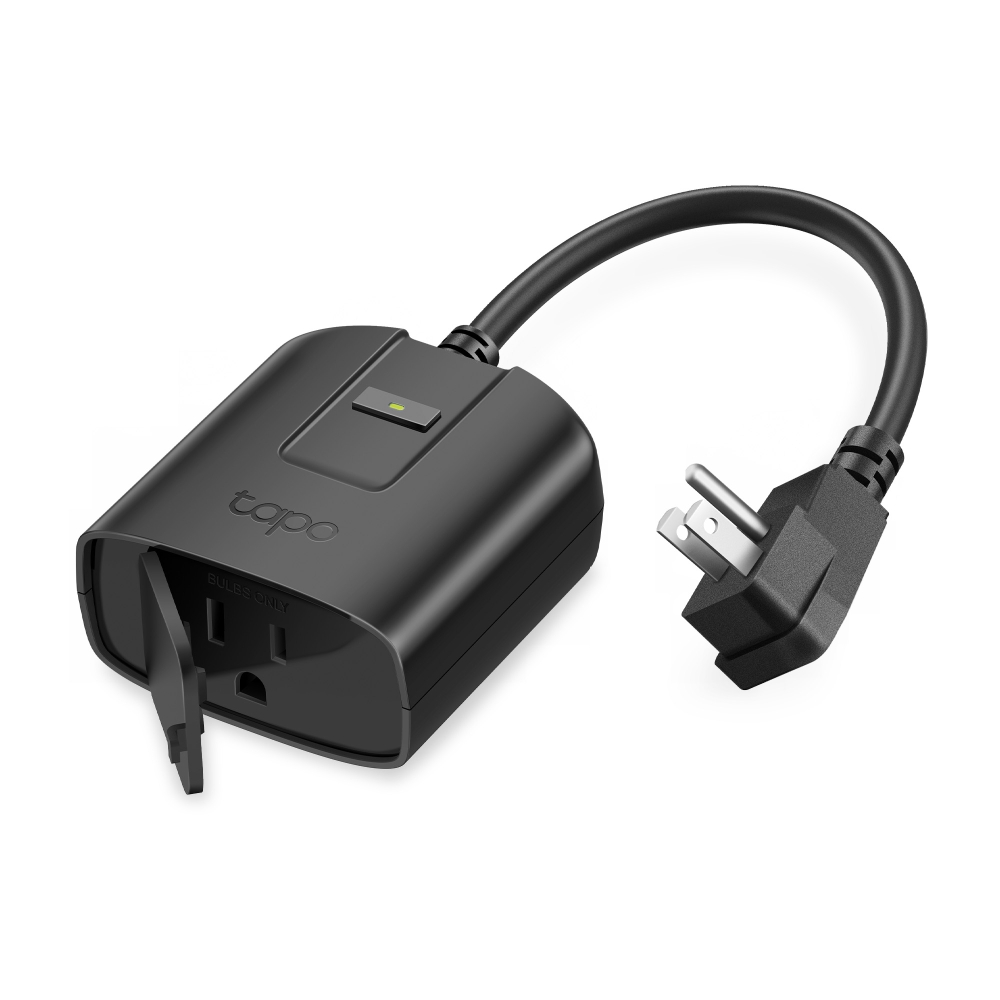
The Tapo P430M is an outdoor plug-in dimmer, so it suits dimmable string lights. TP-Link lists an IP65 weatherproof rating, 2.4 GHz Wi-Fi, Matter certification and a rating of 150 W for LED loads (TP-Link). Check your lights are dimmable and within that load before using the dimming feature.
The Enbrighten Vibe outdoor plug has two independently controlled grounded outlets, handy for two strings or lights plus a fountain. Jasco describes it as connecting over 2.4 GHz Wi-Fi with Matter support and app schedules (Jasco).

| Product | Matter | Connectivity | Price |
|---|---|---|---|
| Tapo P430M Outdoor Smart Dimmer Plug Tapo | Matter native 1.3 (Wi-Fi) | Wi-Fi, Bluetooth | Check price on Amazon |
| Enbrighten Vibe Matter Outdoor Plug Enbrighten | Matter native (Wi-Fi) | Wi-Fi | Check price on Amazon |
More options are in our Matter smart plugs guide. Once a plug is in Apple Home, Google Home or Alexa, create an automation for sunset (on) and sunrise (off); offsets like "30 minutes after sunset" are usually available too.
Step 4: Indoor lights, then the thermostat
Lights. Smart switches and dimmers are usually the best long-term choice because everyone already knows how to use a wall switch. Smart bulbs are great for lamps and color, as long as their switch stays on. Compare options in our dimmer switches guide and smart bulbs guide. If you rent, stick with plugs, bulbs in lamps and battery remotes, and ask before changing switches.
Thermostat. Before buying, check your HVAC system: the wires at your current thermostat, whether you have a C-wire, and whether you have a heat pump, multi-stage or high-voltage baseboard system. Every maker has a compatibility checker; use it. If anything doesn't match, ask an HVAC technician. See our Matter smart thermostats guide.
Step 5: Locks and cameras, later and carefully
If you are moving away from a professionally monitored alarm, know that a set of smart devices is not the same thing as monitored security. It typically won't dispatch help, and features like recording history may need a subscription from the camera maker. Decide what you actually need (monitoring, recording, notifications) before you cancel anything.
For locks, check your door (thickness, backset, deadbolt type), keep a physical key or keypad backup, and make sure everyone in the house can open it without a phone. Our smart locks guide lists Matter models.
Leak protection is another good later project. A leak sensor under the water heater or washing machine is cheap and easy to place, and a smart shutoff valve can close your main water line automatically when it detects water. See our Matter water shutoff valves guide.
Matter in plain English
Matter is a standard that lets a device work with several smart home apps, such as Apple Home, Google Home, Alexa and SmartThings. It lowers the risk of buying into the "wrong" ecosystem, but it does not guarantee that every feature works in every app; energy monitoring, camera features and advanced settings can still live only in the maker's app.
Three terms beginners mix up:
- Matter controller: the app plus home device that adds and runs your Matter devices, such as a HomePod or Apple TV for Apple Home, or a Nest or Echo speaker.
- Thread border router: connects battery-friendly Thread devices (common for locks and sensors) to your home network. Wi-Fi Matter devices, like the two plugs above, don't need one.
- Bridge: translates another system (for example Zigbee lights) into your app.
One box can do several of these jobs. Not every Apple device is a Thread border router: Apple lists the HomePod mini, HomePod (2nd generation), Apple TV 4K (2nd generation) and Apple TV 4K (3rd generation) Wi-Fi + Ethernet model, but not the Wi-Fi-only 3rd-generation Apple TV (Apple Support); check Apple's specs for newer models. For details, see Matter vs Thread vs Zigbee vs Z-Wave explained and Matter hubs and Thread border routers.
Many Wi-Fi smart plugs only connect to 2.4 GHz Wi-Fi, so make sure your router still offers it.
Beginner mistakes to avoid
- Buying a kit for the whole house before one room works.
- Mixing too many apps. Pick one main app for automations, even if devices come from different brands.
- Ignoring the household. If a family member can't turn a light on without a phone, it's not finished.
- Overlooking cloud and subscriptions. Check whether a device works locally, what happens if the maker's servers go down, and what features need a paid plan. Read the privacy policy for cameras especially.
- Skipping the electrical basics. Turn off the breaker, follow the instructions, and call an electrician when in doubt.
Frequently asked questions
What is the easiest first smart home project?
Putting outdoor or lamp lights on a sunset/sunrise schedule with an outdoor-rated or indoor smart plug. It needs no wiring and teaches you how schedules and automations work in your chosen app.
Do I need a hub to start a smart home?
Not always. Many Wi-Fi plugs run schedules from their own app. To add Matter devices and run automations while away in Apple Home, you need a home hub such as a HomePod, HomePod mini or Apple TV 4K; Google Home and Alexa use their own speakers and displays.
Can I use smart bulbs in a fixture with a wall switch?
Yes, but the switch has to stay on so the bulb keeps power. If people in your home habitually use the wall switch, a smart switch or dimmer is usually the better choice.
Does every Apple TV work with Thread devices?
No. Apple lists the Apple TV 4K (2nd generation) and the Apple TV 4K (3rd generation) Wi-Fi + Ethernet model as Thread-enabled, but not the Wi-Fi-only 3rd-generation model. HomePod mini and HomePod (2nd generation) are Thread-enabled too.
Can smart cameras and locks replace a monitored alarm system?
Not directly. Self-installed devices usually don't include professional monitoring or emergency dispatch, and some camera features need a subscription. Decide what level of security you need before cancelling a monitored service.
Are smart home devices OK for renters?
Yes. Smart plugs, bulbs in lamps, battery sensors and remotes need no wiring. Ask your landlord before replacing switches, thermostats or locks.
Related guides
-
Black Friday Matter Deals 2026: Smart Home Gear Worth Buying
Matter plugs, bulbs, locks, sensors, thermostats and hubs worth watching for Black Friday 2026, plus which Thread border router you need and how to shop smart.
-
Best Matter Hubs and Thread Border Routers (2026)
Eight Matter controllers and Thread border routers compared, from Apple, Amazon, Aqara, Aeotec SmartThings and Homey, with advice on Thread networks, bridges and choosing for your ecosystem.
-
Matter vs Thread vs Zigbee vs Z-Wave Explained (2026)
Matter, Thread, Zigbee, Z-Wave — they're not competing standards, they're different layers of the smart home stack. Here's what each one actually does, and how to tell which one your next device uses.
-
Best Matter Smart Water Shutoff Valves (2026): Leak Shutoff Compared
Matter smart water shutoff valves and leak sensors compared: EcoNet Bulldog, Aqara T1, Jinvoo and UseeLink, with advice on valve fit, local leak shutoff and Matter support.