
What's new
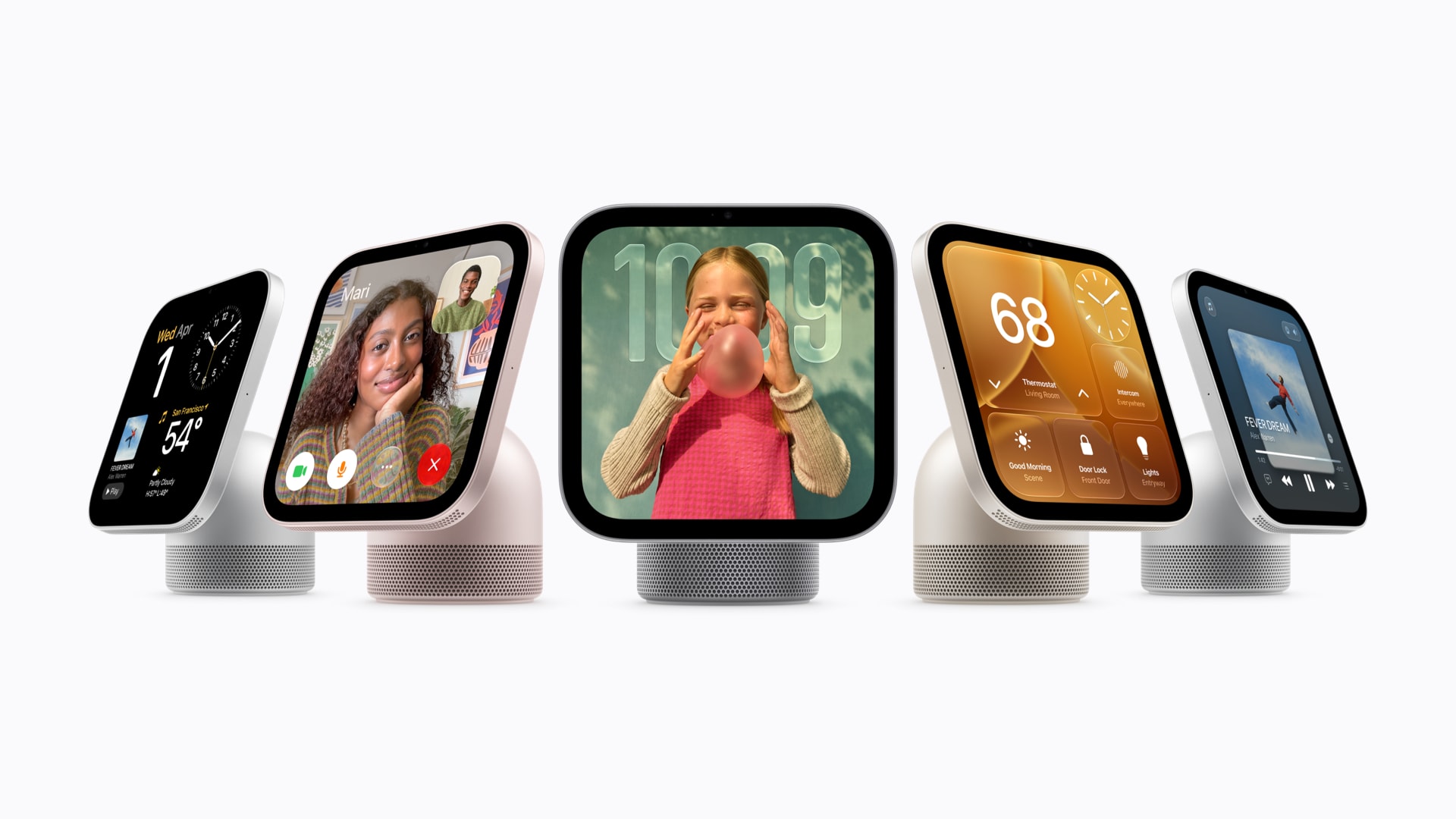
Apple announced HomeView in October and started selling it on November 13. It is a 7-inch smart display with an A18 chip, a 12MP Center Stage camera, speakers and the new Siri AI assistant in beta. Two models share the same screen and radios: a tabletop HomeView on a speaker base, and a thinner HomeView (Wall Mounted) that needs a separate Schneider Home mount.
It is sold in the US, Canada, the UK, Australia, New Zealand, India and Singapore. Apple says it is not for sale in the European Union for now. It also needs an iPhone or iPad on iOS or iPadOS 27.2 or later to set up.
When we covered the HomeView announcement in October, Apple had not said whether it supports Thread. The final technical specifications answer that: HomeView lists Thread networking technology, compatible with HomeKit- or Matter-enabled Thread accessories.
What HomeView does for a Matter home
It becomes your home hub automatically
Apple's support documentation is clear about one requirement: you must set up a home hub before you can add Matter accessories to the Home app. HomePod and HomeView become home hubs as soon as you set them up, while an Apple TV becomes one when you add it to a room.
The hub is what runs automations, keeps remote access working when you are away, and holds the Matter connection to your accessories. Without one, Apple Home can't add Matter devices at all.
It speaks Thread
Most Matter sensors, locks, plugs and many bulbs use Thread, a low-power mesh network. Apple's support page says Thread accessories need a Thread-enabled home hub, giving HomePod mini and Apple TV 4K as examples. HomeView now joins that list on paper, since its spec sheet lists the same Thread radio.
In practice, that means a HomeView can be the box that connects your Thread accessories to your Wi-Fi network, the job usually called a Thread border router. If you already own a HomePod mini or Apple TV 4K, HomeView adds another Thread-capable device to the same home. Apple Home picks which hub is in charge, and several Thread devices on one network make the mesh more resilient.
It is a screen for the Home app
HomeView runs the Home app on the device itself. Apple describes controls for lights, locks and thermostats, camera views of up to nine feeds at once, and a Home Modular face that shows accessory status at a glance. Guests and unrecognized members of the household can still control accessories, set timers and play music without seeing anyone's personal information.

Specs that matter for the smart home

- Display
- 7-inch, 1088 x 1088
- Radios
- Wi-Fi 6E, Bluetooth 6.0, Thread
- Sensors
- Temperature, humidity, ambient light
- Power
- USB-C, 30W adapter included
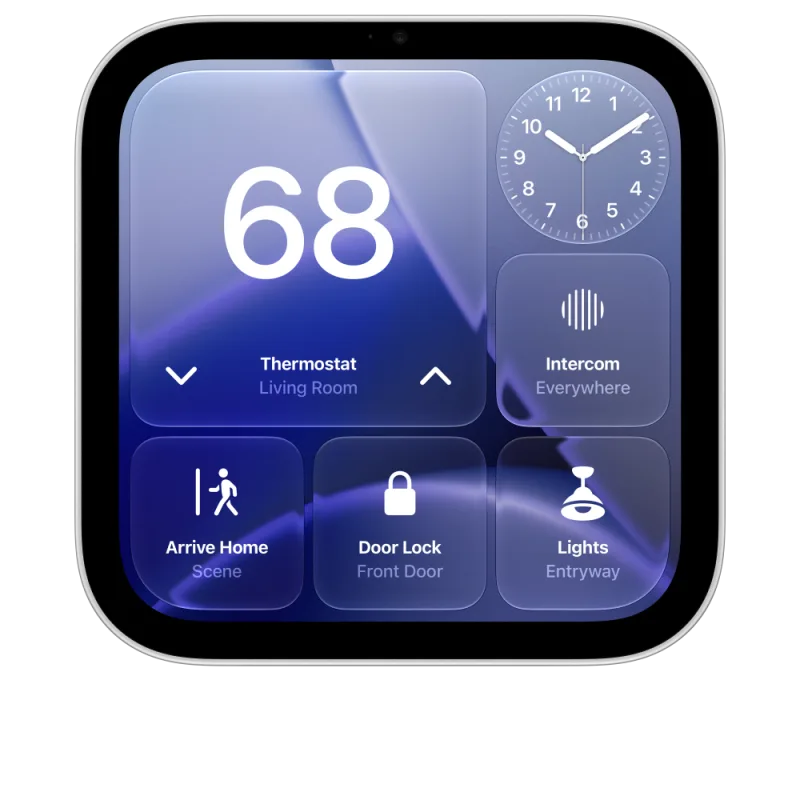
- Display
- 7-inch, 1088 x 1088
- Radios
- Wi-Fi 6E, Bluetooth 6.0, Thread
- Depth
- 0.39 inch
- Power
- Wall mount sold separately
Both models have the same A18 chip, camera and microphones. The tabletop model adds a down-firing woofer and passive radiators in its base, and weighs 2.1 pounds against 0.63 pound for the wall version.
HomeView vs HomePod mini 2 vs Apple TV 4K as a hub
Apple now sells three new devices that can be a Thread-enabled home hub. They differ in ways that matter for Matter:
- HomeView ($299 MSRP): Thread, Wi-Fi 6E and a screen for the Home app. No Ethernet. Temperature and humidity sensor built in.
- HomePod mini 2 ($149 MSRP): Thread, Wi-Fi 6E, an Ultra Wideband chip and a temperature and humidity sensor. It went on sale on October 30. It is the cheapest new way to add Thread to Apple Home.
- Apple TV 4K, 4th generation ($299 MSRP): Thread, Wi-Fi 7 and Gigabit Ethernet. The wired connection keeps the hub off the Wi-Fi for its link back to your router, which many people prefer for the device that anchors their Thread network.
If you have no home hub at all, the HomePod mini 2 is the low-cost entry point. If you want a screen to control the home, HomeView is the only Apple option. If your Thread network is large or your Wi-Fi is unreliable where the hub would sit, the Apple TV 4K on Ethernet is the safer anchor, and HomeView can be a second Thread device next to it.
What works where
HomeView is an Apple Home device. It does not join Google Home, Alexa, SmartThings or Home Assistant as a controller. Matter's multi-admin feature still lets those platforms use the same accessories.
| Feature | Apple Home | Google Home | Alexa | SmartThings | Home Assistant |
|---|---|---|---|---|---|
| HomeView as a controller | |||||
| Acts as home hub for this platform | Supported | Not supported | Not supported | Not supported | Not supported |
| Controls accessories from its screen | Supported | Not supported | Not supported | Not supported | Not supported |
| Matter accessories paired in Apple Home | |||||
| Share to this platform with multi-admin | Supported | Supported | Supported | Supported | Supported |
| Shared Thread devices stay reachable through HomeView | Supported | Supported | Supported | Supported | Supported |
| New Thread devices | |||||
| Pair straight onto HomeView's Thread network | Supported | Partial | Partial | Partial | Partial |
Apple Home Collection arrives in December
HomeView was designed alongside Apple Home Collection, a set of accessories made with LG Electronics and Schneider Electric. Apple says Home Collection starts shipping in December, with some products in early 2027. The parts that matter for Matter:
- LG Smart Deadbolt Lock ($349.95 MSRP): Matter compatible and supports Aliro, the digital key standard from the same alliance behind Matter. Apple says core access works locally without the internet.
- LG Smart Thermostat and Schneider Home Smart Thermostat ($199.95 MSRP each): both Matter compatible, with LG and Schneider room sensors at $39.95 MSRP.
- Thread across the line: Apple says every Home Collection device supports Thread, and they set up with a tap of an iPhone.
Apple says the Home Collection features beyond basic control need a compatible home hub such as HomeView, HomePod or Apple TV. We covered the Home Collection lineup when it was announced.
What to pair with it
HomeView doesn't need Apple's own accessories. Any Matter certified Thread device works in Apple Home once a Thread-enabled hub is on the network. Thread battery sensors and plugs are the easiest way to make use of the radio. Current prices for HomeView and a few Thread devices that work well in Apple Home:
| Product | Matter | Connectivity | Price | Buy |
|---|---|---|---|---|
|
Apple HomeView (Tabletop, Silver)
MDH14LL/A
|
Matter | Thread / Wi-Fi / Bluetooth |
$299.00
Price as of Nov 21, 2026, 12:33 AM ET
|
Buy on Amazon |
| Apple HomeView (Wall Mounted) | Matter | Thread / Wi-Fi / Bluetooth |
$299.00
Price as of Nov 21, 2026, 12:33 AM ET
|
Buy on Amazon |
| Eve Energy Smart Plug | Matter 1.3 | Thread / Bluetooth |
$28.95
Price as of Nov 21, 2026, 12:31 AM ET
|
Buy on Amazon |
| Eve Motion (Matter) | Matter 1.0 | Thread / Bluetooth |
$38.46
Price as of Nov 21, 2026, 12:31 AM ET
|
Buy on Amazon |
| Eve Door & Window Sensor | Matter 1.0 | Thread / Bluetooth |
$29.99
Price as of Nov 21, 2026, 12:31 AM ET
|
Buy on Amazon |
| Eve Weather Station (Thread) | Matter 1.3 | Thread / Bluetooth |
$64.99
Price as of Nov 21, 2026, 12:31 AM ET
|
Buy on Amazon |
| Nanoleaf Thread A19 Bulb (3-Pack) | Matter 1.2 | Thread / Bluetooth |
$39.99
Price as of Nov 21, 2026, 12:31 AM ET
|
Buy on Amazon |
|
Aqara Floor Lamp T1
LB-L18E
|
Matter 1.3 | Thread / Zigbee / Bluetooth |
$95.99
Price as of Nov 21, 2026, 12:33 AM ET
|
Buy on Amazon |
Who should buy it
-
No Apple home hub yetHomePod mini 2 is the cheaper way to add Thread.
-
Want a screen for HomeHomeView: Thread hub plus touch controls.
-
Large Thread networkApple TV 4K on Ethernet as the main hub.
-
Entryway control panelHomeView (Wall Mounted) with a Schneider mount.
-
Living in the EUNot on sale: Apple isn't selling HomeView there yet.
-
Mixed Google or Alexa homeAny Thread hub works: share devices with multi-admin.
For Matter households, the important detail in HomeView's final spec sheet is the single line about Thread. It means Apple's new display is a full home hub for Thread accessories, not just a remote control for the Home app. Whether it is the right hub depends on where it sits: a screen in the kitchen on Wi-Fi is a good second Thread device, while the box at the center of a big network is still best on a cable.
As an Amazon Associate, we earn from qualifying purchases. Product links on this page are affiliate links; they do not change the price you pay. Prices may change after publication.